

How it works
Two ways to hand a client their invoices — send them to their own portal, or embed that portal in your website. Same three steps either way.
1. Connect Xero
Sign in with your Xero account. We ask only for read-only access: your contacts, your invoices, and your organisation's details, so we know whether to charge you GST. Nothing we're given can change anything in Xero.
2. Share a client — or embed the portal
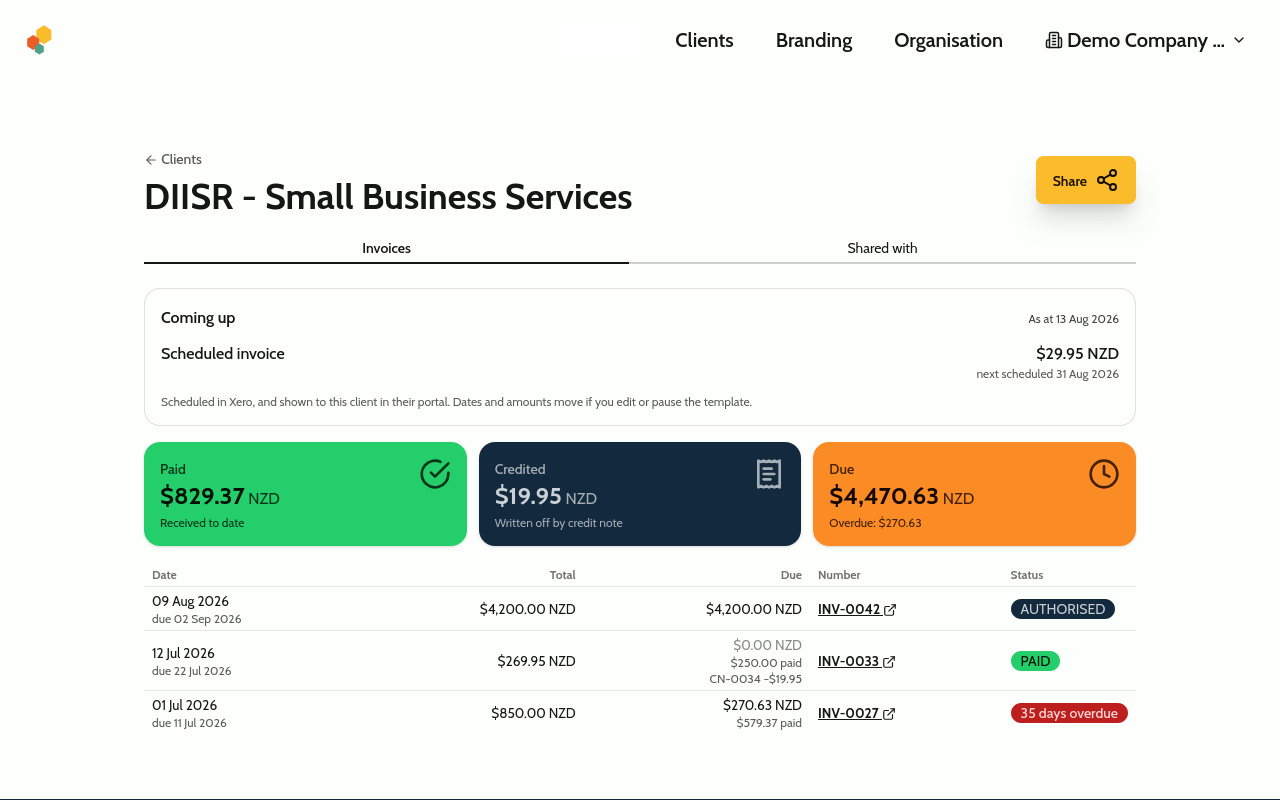
Open a client, hit Share, and enter their email, and we send them a secure link to their finalised invoices. Or drop the portal into your own website, so they never have to leave it — only the web addresses you allow can embed it.
3. Clients view their invoices
Every finalised invoice you've issued them, in one place — reached by one-time link, or already open inside your own site. No password either way.
Get paid in Stripe, invoiced in Xero, shown on your own site
Either path above can run itself. If you take payments through Stripe, you already know the gap: the money arrives, and someone still has to raise the invoice. Connect your Stripe account to a Xero organisation and we close it.
1. Connect Stripe
Point your own Stripe account at one Xero organisation. We only ever read your Stripe — we never create charges, refunds or payouts.
2. A customer pays you
Through your own Stripe account, on your own checkout. Nothing about how you take money changes, and we never hold your Stripe keys.
3. We raise the invoice
A sales invoice appears in your Xero and is marked paid — coded to the account, tax type and bank account you chose. Your books stay yours; we just stop you typing them up.
Built for trust
Read-only & revocable
We only read your Xero organisation — unless you turn on auto-invoicing for it, which Xero asks you to approve separately. You can revoke any client's access instantly.
No client accounts
Clients sign in with a single-use link that expires in 15 minutes. Nothing to remember, nothing to leak.
Works across organisations
Connect multiple Xero organisations and switch between them. Clients see everyone who shared with them in one place.
Always up to date
Change an invoice in Xero and it updates in your client's portal automatically — no need to re-share. Clients open each invoice on Xero's own secure invoice page, so they always see the current version.
Simple pricing that grows with you
Free for up to 3 client businesses · upgrade as you grow.
Connect Xero, browse your clients and invoices, and share with up to 3 client businesses at no cost. When you outgrow that, pick a plan by how many businesses you share with — all the way up to Enterprise.
A client is a business, not a person — invite as many people there as you like, at no extra cost. Only the businesses you share with count towards your plan.
Starter
NZ$10/month + GST
Save NZ$20 a year
- Up to 250 client businesses
- Your logo, colours & portal address
Standard
NZ$35/month + GST
Save NZ$70 a year
- Up to 2,000 client businesses
- Your logo, colours & portal address
Pro
NZ$90/month + GST
Save NZ$180 a year
- Up to 10,000 client businesses
- Your logo, colours & portal address
- Stripe auto-invoicing & the embeddable portal
Free
Connect Xero, browse everything, and share invoices with up to 3 client businesses — free forever, no card needed.
Connect Xero — freePrices exclude GST. New Zealand organisations have 15% GST added; organisations outside New Zealand pay the price shown.
No card needed to look around — sign in with Xero and explore. Cancel any time. See the documentation for the full picture.
Frequently asked questions
Do my clients need a Xero account to view their invoices?
No. Your client gets a secure one-time link by email — no Xero account, no password, and nothing to sign up for. It's the effortless alternative to making customers create a Xero login just to see their invoices.
How is this different from Xero's online invoice links?
Xero sends one link per invoice, or asks your customer to create a Xero account to see them all. Client Invoices gives each client a single passwordless portal showing every invoice you've shared with them.
Can my clients pay their invoices through the portal?
Yes. Each invoice opens on Xero's own secure invoice page, so whatever payment options you've set up in Xero — such as card payments or direct debit — are right there for your client to use.
Is it secure? Can the app change anything in my Xero?
Read-only unless you ask otherwise. By default we request read access to your contacts, your invoices and your organisation's details (we use the details to find your organisation's country, which decides whether we charge GST, and to tell whether it is one of the demo companies Xero gives every user), and nothing else. The one exception is auto-invoicing: if you connect Stripe and switch it on for an organisation, Xero asks you to approve create-invoice permission separately, and we then raise sales invoices there for payments you receive. Every other organisation stays read-only, and you can revoke a client's access — or disconnect Xero — instantly. Clients sign in with single-use links that expire in 15 minutes.
Can a client see invoices from more than one business?
Yes. A client signs in once and sees every business that has shared invoices with them, each listed separately.
Which invoices get shared?
You share a client, and they get all of their finalised sales invoices — sharing a single, hand-picked invoice on its own isn't supported yet. Drafts and bills are never shared.
Can my clients sign in from my own website?
Yes. You get a sign-in link to add to your site, and your clients land on a page with your logo and colours — plus a link back to your website. It reads as part of your business, not a detour to ours.
What happens when I reach my plan's client limit?
Nothing breaks. Every client you've already shared with keeps their access — we never revoke anything. You just can't share with a new client business until you upgrade your plan (which you can do in-app at any time) or revoke an existing client's access. Adding another person at a client you already share with is always free and never counts again.
Can you raise the invoice for me when someone pays?
Yes, on the Pro plan. Connect your own Stripe account to a Xero organisation, and when a customer pays you we raise the sales invoice in that organisation and mark it paid, coded the way you choose. We only ever read your Stripe — we never create charges, refunds or payouts — and Xero asks you separately for permission to create invoices in that one organisation. Leave it off if you already invoice those payments another way, or the same sale will be raised twice.
Can I put the invoice portal inside my own website?
Yes, on the Pro plan. Your site mints a short-lived token for one customer and embeds the portal, so they read their invoices without leaving your website. Only the web addresses you allow can embed it, and a token for one customer can never show another's invoices. It needs a developer on your side for the token step.
How do you count clients?
By the business, not the person. If three people at one client each need their own sign-in, that is still one client on your plan — invite as many as you like at no extra cost. Only the number of client businesses you share invoices with counts towards your limit.
Can I use my own branding?
Yes, on every paid plan you can add your logo, pick your portal colours, and choose your own unique portal address; your clients see your brand on the sign-in page, their invoice list and the emails we send, with a small "powered by Client Invoices" note. On the free plan they see your business name and our branding.
Ready to stop resending invoices?
Connect Xero in seconds and give your clients one place for everything. No card needed to look around.
Connect Xero — free